Introduction
Microsoft Teams Meeting Attendance and Engagement report provides information about who attended the meeting, webinar, or town hall, along with the exact times each attendee joined and left.
The official documentation also states
Organizers with the appropriate license
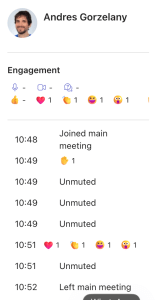
(Teams Premium for meetings or Teams Enterprise for events)can see engagement information that captures how attendees reacted and interacted during the meeting or event. The engagement data shows the total count of attendees that performed the following actions:
- Unmuted during the meeting or event
- Turned on their cameras
- Raised their hands
- Used each type of meeting reaction
- Initiated questions, answers, and discussions through Q&A.
EDIT: The documentation has been updated by my request on May 28.
The sentence I marked in bold makes me think that Teams Premium is still required to obtain engagement information from regular Teams Meetings, and that a Teams Premium license is not required to receive engagement reports for events (Town-Halls, Webinars).
Sample engagement report:
At the top of the same Learn article, there is a section that stands out as Important that mentions changes on April 1.
Licensing update for Teams Premium and Teams Enterprise
As of April 1, 2026, some features that were previously only available with Teams Premium are now included with Teams Enterprise. Teams Premium continues to offer advanced meeting protection, advanced communication (like the Queues app), branding and personalization, and intelligence capabilities.
It says “Some features”, but it doesn’t specify clearly which ones; it just gives some examples.
Customer calls
I received a call from a customer saying that organizers without a Teams Premium license started noticing engagement information in the attendance report for regular meetings.
Upon investigation on my own tenant, I can confirm what the customer said to me.
For the customer, this is a privacy concern, so they decided to open a case and disable the Attendance and Engagement report from any Meeting policy urgently:

The same as PowerShell parameters for the Set-CsTeamsMeetingPolicy cmdlet:
Set-CsTeamsMeetingPolicy -Identity MeetingPolicyName-AllowEngagementReport Disabled-AllowTrackingInReport Disabled-InfoShownInReportMode IdentityOnly
Documentation update is required
I think that the Learn article needs to be updated to clarify this exactly. I welcome that this feature does not require Premium license anymore, but it should be clearly stated, as for some companies it could be something that has privacy concerns.
I really miss the times when Microsoft documentation was open-sourced, and GitHub issues could be opened against it; those times are gone now, and we are left with reporting on blog posts like this.
 Andrés Gorzelany
Leave a comment