
Probably, we all know the great Message Header Analyzer, it has been the default troubleshooting tool when we want to understand the routing that an email message took and, among other things, the Sender Policy Framework, SPAM verdicts and Domain-Keys Identified Mail (DKIM) information. I was on a meeting with a customer analyzing headers and I thought: Is Microsoft 365 Copilot any good in doing for us the analysis and investigation of message headers when troubleshooting SPF, DKIM and mail routing? Let’s see
The prompt
I asked Copilot if it could analyze message headers, Copilot replied yes, please paste them, and resulted in a pretty well organized answer, so I asked Copilot to please elaborate the prompt that resulted in that answer:
Please analyze in depth a message header, I will paste after this prompt, and provide the following:
- Determine the true source of the email and reconstruct the full mail flow hop-by-hop.
- Explain SPF, DKIM, and DMARC results at every stage where they appear.
- Identify where authentication failures occurred and why.
- Determine whether the message is legitimate or spoofed.
- Summarize which systems altered or re-wrapped the message.
- Provide a clear, human-readable explanation of the mail path.
- Highlight any unusual or suspicious elements.
- Provide recommended remediation or configuration improvements if the failures are due to forwarding or hybrid mail flow issues. Your explanation should be: – technically accurate, – detailed yet easy to follow, – structured with headings, – and conclude with an overall verdict about message legitimacy. Do not paraphrase the headers; analyze them logically.
I will paste the headers next.
The result
I analyzed a valid e-mail and and an email identified as spam, I won’t include the whole responses here because they are too long, but let’s go deep in the interesting parts about SPF, DKIM and DMARC:
SPF analysis
The valid e-mail
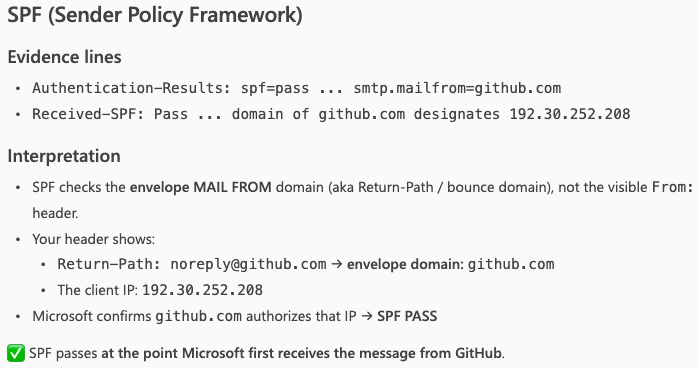
Copilot explained why the email headers showed that the Sender Policy Framework passed the checks (and it is right there in the header when it says domain of github.com designates 192.30.252.208 as permitted sender). The sender IP is included in the SPF DNS Record.
The spam e-mail
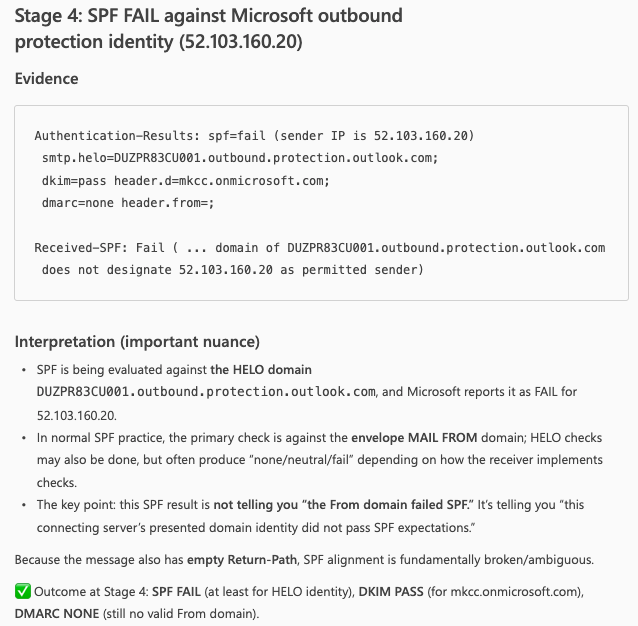
Copilot explained why the email headers showed that the Sender Policy Framework failed the checks (and it is right there in the header when it says domain of DUZPR83CU001.outbound.protection.outlook.com does not designate 52.103.160.20 as permitted sender). The sender IP is not included in the SPF DNS Record. This a typical practice of spammers trying to impersonate valid e-mail systems, the good thing is that the receiving e-mail system did the proper checks.
DKIM analysis
The valid e-mail
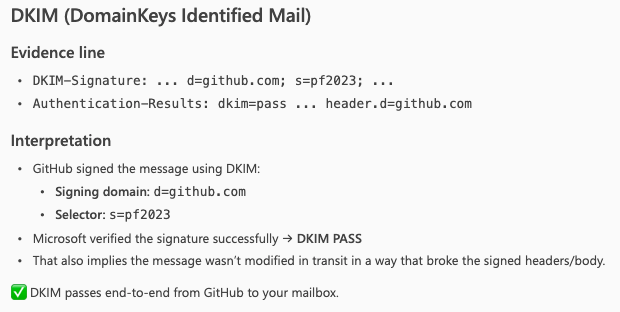
Copilot included an explanation why the DKIM passed for this message, as the receiving e-mail system read the public key from DNS and used it to verify the signature found in the DKIM-Signature header of the message
The spam e-mail
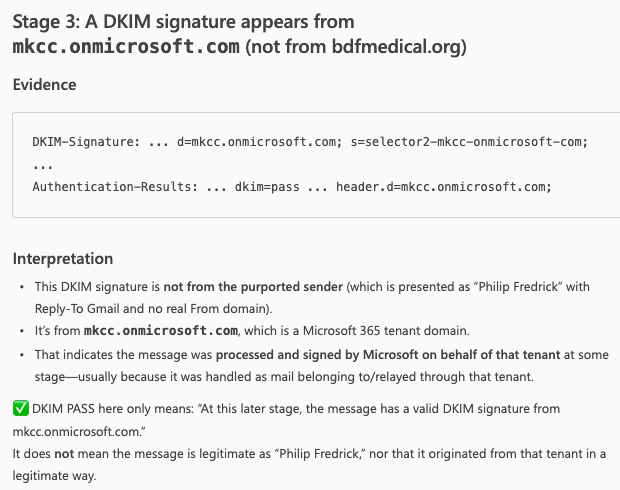
The receiving e-mail system checked for DKIM and it did not fail, if we look in detail, Copilot is explaining it is from a valid Microsoft 365 tenant domain (the default domain or MOERA domain that every tenant has) and it is a typical domain used for abuse sending unsolicited e-mail. More on this here.
DMARC analysis
Valid e-mail
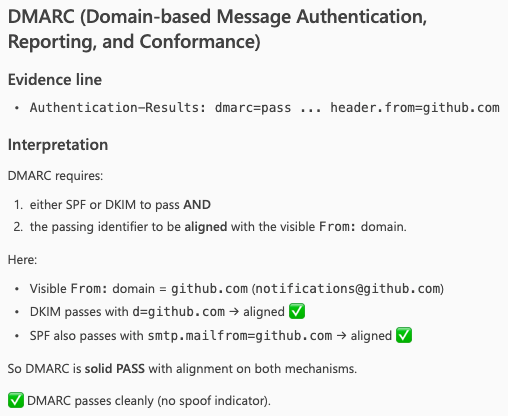
Copilot, once again, includes a well explanation why DMARC is passing.
Spam e-mail

DMARC resulted in none because the from header was blank. All of this resulted in this e-mail identified as spam and sent to Junk folder.
Conclusion
After putting Microsoft 365 Copilot through both scenarios, a clean message where SPF, DKIM, and DMARC all passed, and a more complex case where authentication failures were present,the results are worth talking about.
On the clean message, Copilot delivered exactly what you’d expect: a well-structured, hop-by-hop breakdown with accurate interpretation of all three authentication mechanisms. Nothing surprising there, but reassuring.
The more interesting result came from the second case. Copilot didn’t just flag the failures, it explained why they occurred, and identified where in the mail flow things broke down. That’s the kind of analysis that normally takes time to piece together manually, and having it structured and readable in seconds has real value.
Is it a replacement for Message Header Analyzer? No. But it’s a genuinely useful addition to your workflow, particularly when you need to move fast, explain complex results clearly, or just want a second opinion on what you’re looking at.
The prompt matters though. A vague question gets a vague answer. The structured prompt we used here was key to getting output that was actually worth using.
 Andrés Gorzelany
Leave a comment