
Introduction
Last month, I wrote about blocking Otter.Ai from joining Teams Meetings. Joining a meeting, I noticed another AI Meeting service called “Read.Ai” so I wanted to know how it worked to record, transcribe and do AI stuff on the meeting. Essentially, it works pretty the same way as Otter.Ai, so you can open that other blog post in a new tab and read here to know the particularities of this “Read.AI” service, the same procedures to try to block it apply.
Read.Ai specifics
Upon signing-in, it requests Graph permissions, but I noticed it requests more permissions than the other service:
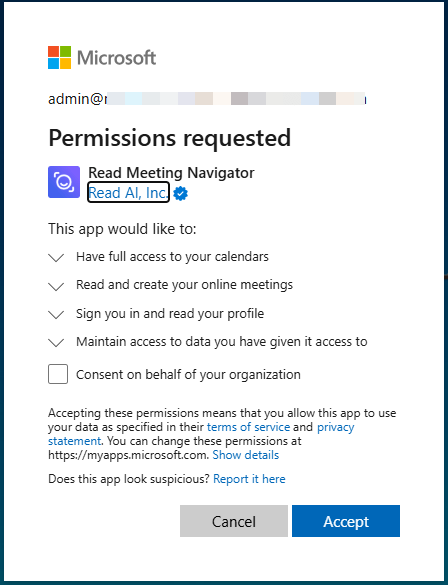
Those permissions translate to these Graph delegated permissions
- Calendars.ReadWrite (Have full access to user calendars)
- OnlineMeetings.ReadWrite (Read and create user’s online meetings)
- User.Read (Sign in and user user profile)
- email (View users’ email address)
- offline_access (Maintain access to data you have)
- openid (Sign users in)
- profile (view users’ basic profile)
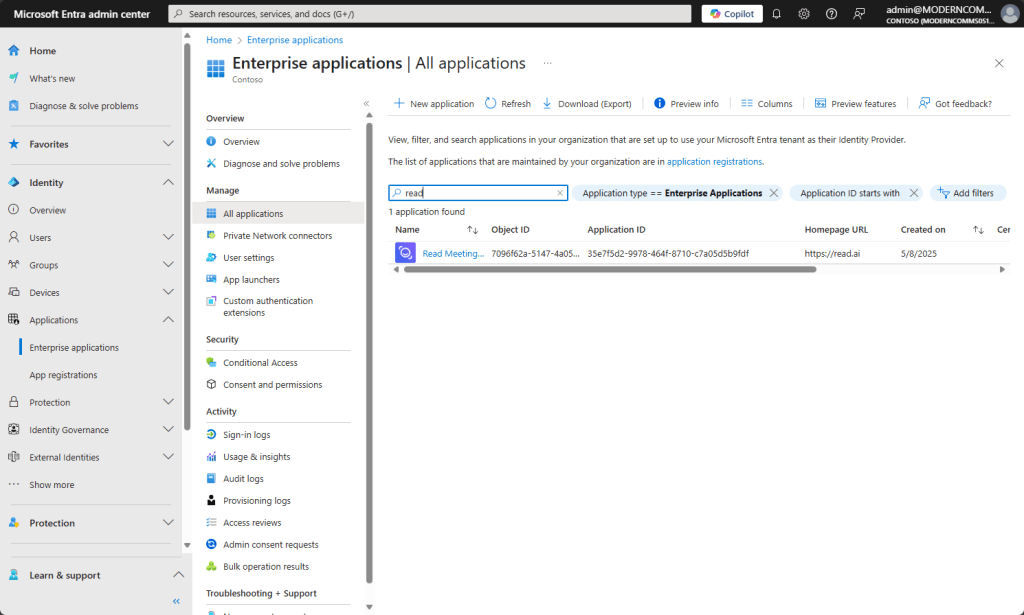
On successful login, an Enterprise application app with guid 35e7f5d2-9978-464f-8710-c7a05d5b9fdf will be created in our tenant
How it looks in Teams
When you schedule or receive a Teams meeting, the read.ai will try to join the meeting
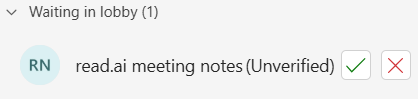
Participants will be let know when it joins the meeting

Limitations?
When joining another’s tenant meeting, I did notice that read.ai bot was trying to join so if you don’t want it you cannot admit it from the lobby or kick it out.
Conclusion
The goal of this post isn’t to show the functionalities of this service, if a company allows it, it’ll probably do a good job, but if your company doesn’t allow third party recording, transcription or AI services, you can use this guide (complemented with the other linked at the beginning) to try to prevent it.
 Andrés Gorzelany
Leave a comment