
Introduction
Did you know that, even if you have enabled Giphy in your Teams Messaging Policy (Teams Admin Center- Messaging – Global (Org-wide default) or any custom policy – Giphy in conversations, it is part of the additional connected experiences cloud policy?:
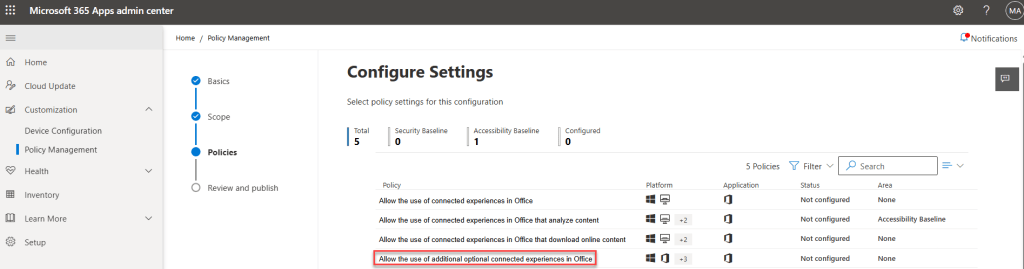
It is described like this:
This policy setting allows you to control whether additional optional connected experiences are available to your users when they’re using Office. Additional optional connected experiences are offered by Microsoft directly to your users and are governed by terms other than your organization’s commercial agreement with Microsoft. Inserting an online video into a PowerPoint presentation or the 3D Maps feature in Excel, which uses Bing, are examples of additional optional connected experiences.
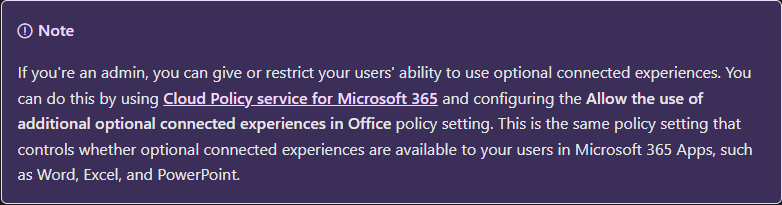
There is no mention of Giphy on Teams there, however, it is mentioned on this official article for Teams titled “Overview of optional connected experiences in Microsoft Teams” and it clearly states that configuring the cloud policy will have an effect on GIF availability on end users:
The problem
This same policy has been available as a Group Policy (GPO) for a long time; it has the same name and the reg key is ControllerConnectedServicesEnabled (a value of 2 disables it) under the reg key path HKEY_CURRENT_USER\Software\Policies\Microsoft\office\16.0\common\privacy.
Chances are, you are migrating from GPOs to Cloud Policies, and had this policy set to disabled for whatever reason (maybe Data Privacy didn’t approve), you’ll notice now that GIPHY doesn’t work anymore, why? It seems Teams honors the Cloud Policy setting (hence, it seems it ignored what was there defined in GPO).
Conclusion
There are different types of Connected Experiences, the “standard” one, the one that analyze content, the one that download content and this additional one, unfortunately, documentation about this additional one is not so clear. However, based on the footnotes on that article, we can conclude it includes:
- Inserting an Online Video in PowerPoint
- 3D Maps feature in Excel
- Map Chart
- Print (Mobile)
- Research Services
- Smart Lookup
- Insert Online 3D Models
- Insert Online pictures
- Interesting Calendars
- Location Suggestions
- PowerPoint QuickStarter
- Researcher
- Travel times estimates in Up Next
- Weather bar
- Weather on calendar
- Teams GIPHY
So a decision will have to be made, either keep the policy disabled and take away GIPHY from users, or enable if you allow also those other features (under different agreements as the documentation states).
 Andrés Gorzelany
Leave a comment